[toc]
Gemini Banana Pro low-quality outputs cause blurry images vague text and weak results but this guide shows exactly how to fix quality issues fast today
If you are seeing inconsistent visuals flat responses or outputs that feel rushed you are not alone. Gemini Banana Pro is powerful but it is also sensitive to how you use it. The good news is that most quality problems come from a small set of fixable mistakes. Once you understand those patterns the improvement is immediate and noticeable.
Why Gemini Banana Pro Low-Quality Outputs Happen
Gemini Banana Pro low-quality outputs usually come from a mismatch between what the model expects and what the user provides. The model is not guessing randomly. It follows structure rules weighting systems and context windows very strictly.
Here are the most common causes behind Gemini Banana Pro low-quality outputs.
- Overloaded prompts where too many instructions fight each other
- Missing constraints like style format or resolution guidance
- Generic language that gives the model nothing concrete to optimize
- Default settings that were never tuned for quality output
Think of Gemini Banana Pro like a precision instrument. If your input is vague the output will be vague too. Gemini Banana Pro quality improves when you narrow the decision space instead of expanding it.
Hidden Settings That Affect Gemini Banana Pro Quality
Most users never touch the settings panel and that is a big reason Gemini Banana Pro low-quality outputs keep showing up. The defaults are designed for speed not precision.
When To Use Right AI Tools: ChatGPT, Gemini, Grok & More
To improve Gemini Banana Pro quality you should pay close attention to:
- Temperature higher values increase creativity but reduce consistency
- Top-p sampling controls how adventurous the model becomes
- Output length limits that silently cut off detail
- Image resolution caps that affect sharpness and realism
Lowering randomness and increasing structure almost always improves Gemini Banana Pro quality especially for professional or commercial use cases.
Prompt Mistakes That Destroy Output Quality
Even with perfect settings Gemini Banana Pro low-quality outputs will continue if the prompt itself is flawed. This is where most people unknowingly sabotage results.
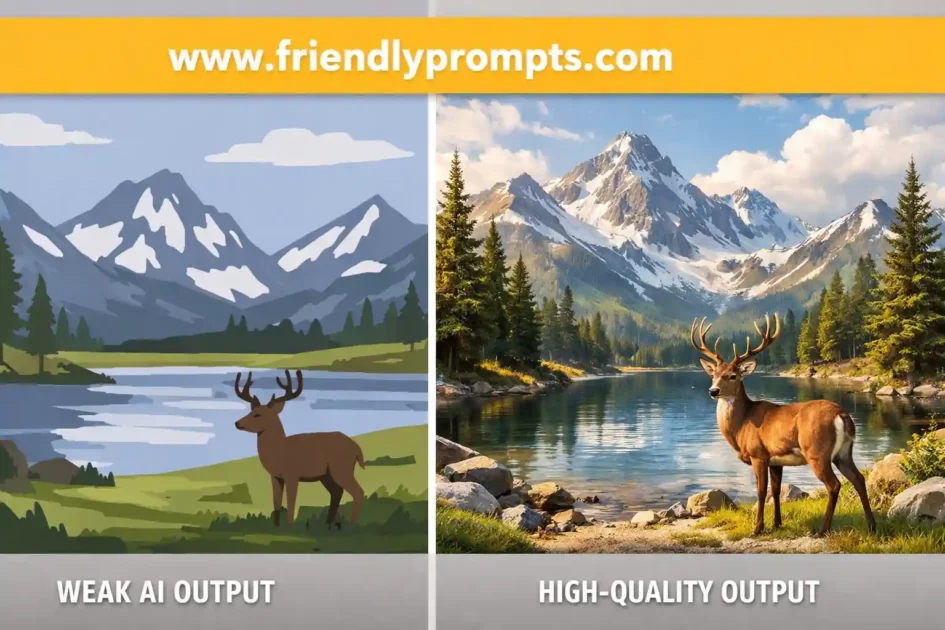
A weak prompt looks like this:
Create a high quality image of a modern office.
A strong prompt that improves Gemini Banana Pro quality looks like this:
Create a photorealistic modern office interior with natural daylight floor to ceiling windows neutral color palette shallow depth of field shot on a 35mm lens ultra sharp focus
Notice the difference. The second prompt removes ambiguity. Gemini Banana Pro quality improves because the model has fewer choices to make.
Common prompt errors include:
- Using buzzwords without visual meaning
- Skipping style references entirely
- Not defining perspective lighting or tone
- Asking for too many concepts at once
AI Prompting Strategies Every Professional Needs in 2025
How to Improve Gemini Banana Pro Quality Step by Step
This is the repeatable process professionals use to eliminate Gemini Banana Pro low-quality outputs.
- Start with a single clear objective
- Define the format style and level of detail
- Lock randomness settings before prompting
- Iterate by refining not expanding
- Save high performing prompts as templates
Once you follow this flow Gemini Banana Pro quality becomes predictable instead of hit or miss.
Important: If you want tested prompt frameworks and quality-safe templates refer to https://friendlyprompts.com where these techniques are broken down with real examples.
Advanced Prompt Techniques for Consistent Results
Advanced users reduce Gemini Banana Pro low-quality outputs by layering prompts instead of dumping everything at once.
This technique is called progressive prompting. You guide the model in stages rather than one giant instruction block.
Example flow:
- Step 1 Generate structure only
- Step 2 Refine style and realism
- Step 3 Enhance details and polish
This approach dramatically improves Gemini Banana Pro quality because each step reinforces the last instead of competing with it.
At the same time this method reduces wasted generations and makes output tuning much faster.
Again detailed walkthroughs and reusable prompt stacks are available at https://friendlyprompts.com if you want a shortcut.
Prompts That Fix Gemini Banana Pro Low-Quality Outputs
This section gives you practical prompts designed specifically to eliminate Gemini Banana Pro low-quality outputs. Each prompt is written to constrain ambiguity and push Gemini Banana Pro quality higher with every generation.
Prompt 1: Precision Image Quality Recovery
AI Model or Tool: Gemini Banana Pro
Create a highly detailed, photorealistic image with sharp focus, realistic lighting, accurate textures, and balanced composition. Avoid blur, artifacts, or stylized distortion. Prioritize clarity, realism, and clean edges in the final output.How to use it: Use this prompt when Gemini Banana Pro low-quality outputs appear blurry or unfinished. Keep temperature low and reuse this as a base layer before adding creative elements.
Official tool link: https://deepmind.google/technologies/gemini/
Prompt 2: Structured Output Enhancement
AI Model or Tool: Gemini Banana Pro
Generate output using a structured and logical format. Maintain consistency, clear hierarchy, and detailed execution. Eliminate vague language and focus on precision and completeness.How to use it: This prompt improves Gemini Banana Pro quality when text outputs feel shallow or repetitive. Combine it with explicit formatting instructions.
Official tool link: https://deepmind.google/technologies/gemini/
Prompt 3: Progressive Refinement Prompt
AI Model or Tool: Gemini Banana Pro
First generate a clean base version of the output. Then refine it for detail accuracy clarity and realism. Finally enhance with subtle polish while preserving realism and consistency.How to use it: Run this in stages. Progressive refinement significantly reduces Gemini Banana Pro low-quality outputs caused by overloaded prompts.
Official tool link: https://deepmind.google/technologies/gemini/
Final Thoughts on Gemini Banana Pro Quality
Gemini Banana Pro low-quality outputs are not a limitation of the model. They are a signal that the system needs clearer direction stronger constraints and smarter iteration.
Once you focus on structure precision and controlled randomness Gemini Banana Pro quality becomes reliable and professional. Treat prompts like instructions not suggestions.
If you want ready made prompt systems and quality tested workflows visit https://friendlyprompts.com for deeper guidance.
Frequently Asked Questions
What causes Gemini Banana Pro low-quality outputs?
Gemini Banana Pro low-quality outputs are usually caused by vague prompts excessive randomness or default settings optimized for speed instead of quality.
How to Resolve Low-Quality Outputs in Gemini Banana Pro
To resolve Gemini Banana Pro low-quality outputs reduce randomness clarify prompts and apply structured progressive refinement techniques.
How to Improve Output Quality in Gemini Banana Pro
Improving Gemini Banana Pro quality requires precise prompts controlled settings and step by step refinement rather than single large instructions.
Does temperature affect Gemini Banana Pro quality?
Yes higher temperature increases creativity but often reduces Gemini Banana Pro quality and consistency especially for professional outputs.
Why do Gemini Banana Pro images look blurry?
Blurry results usually come from missing resolution guidance unclear visual language or overly creative sampling settings.
Are default settings good enough for quality work?
No default settings prioritize speed. Adjusting them is essential to prevent Gemini Banana Pro low-quality outputs.
Can prompts alone fix low-quality outputs?
Prompts play a major role but best results come from combining strong prompts with optimized settings.
Is progressive prompting better than single prompts?
Yes progressive prompting reduces confusion and significantly improves Gemini Banana Pro quality.
How many iterations should I run?
Most users see major improvements within three focused iterations when fixing Gemini Banana Pro low-quality outputs.
Where can I find proven Gemini Banana Pro prompts?
You can find tested prompt frameworks and quality focused workflows at https://friendlyprompts.com.